

About
Researchvideo - Built for JYU research
Mainly Researchvideo is used by research groups, but it is also available to other staff members and students doing research (like thesis).
MyJYU AI Transcription
In the MyJYU AI Transcription service, AI automatically transcribes and if necessary, also translates interview material. The service is aimed for all JYU staff members and students doing research (like a thesis).
Feature hightlights
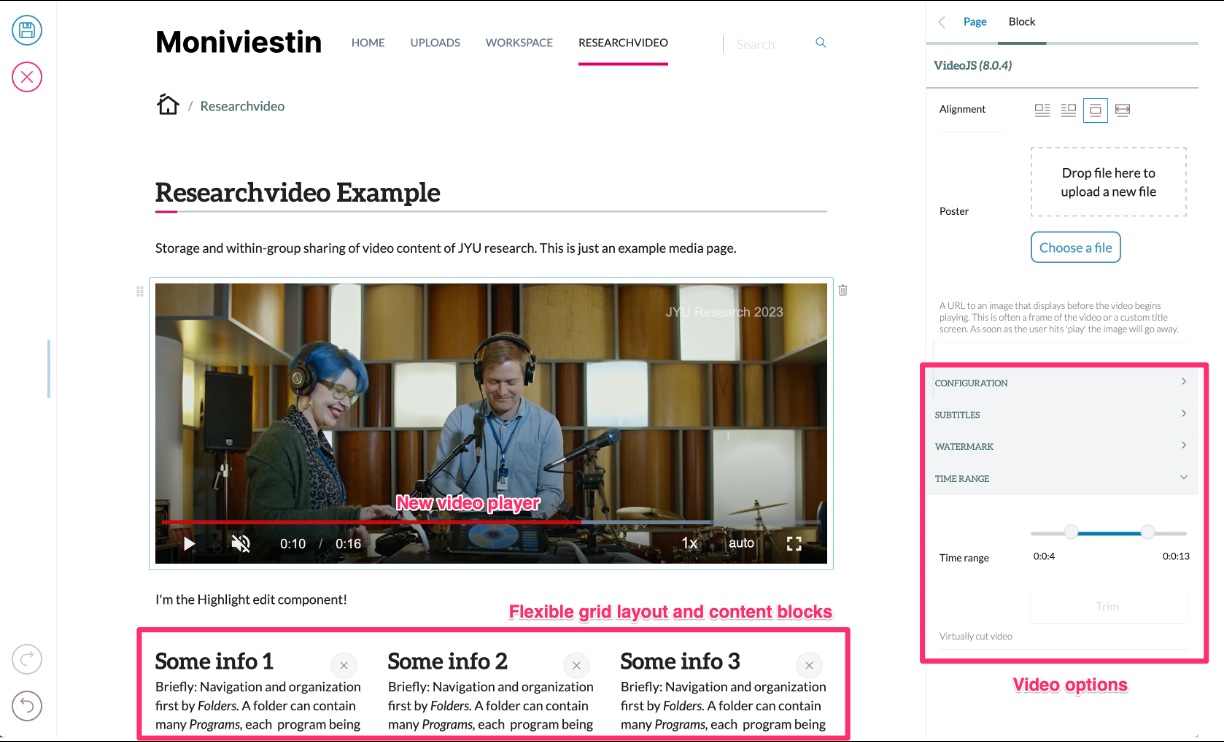
Researchvideo includes multiple features especially useful in research. Everything is built considering the needs of researchers and research projects at JYU.
- Secure data storage in local JYU servers
- Suitable even for sensitive material
- Selected technologies are based on limitless open source licences
- Automatic subtitle generation using Whisper AI technology
- Integration possibilities to multiple login services (HAKA, Azure AD, IDM, Google etc.)
- Integration to Camunda process engine
- Integration to MyJYU mobile app for audio recordings
Upload video and audio
In Researchvideo, you can e.g. do the following:
- Upload video or audio files. Files will be automatically encoded so that the can be played
- Play video and audio files and share them to project group
- Trim video clips and enhance audio fidelity
- Transcribe and translate media files
- Edit media pages - using a full-featured content management system (Plone 6). Enhance pages with text, images, files or visual layouts
- Edit and download transcriptions
- Change videoplayer settings - show only audio, change video size, adjust player settings etc.
No VPN connection is required!
Automatic transcription
One of the main functionalities is the ability to automatically transcribe videos.
- Transcribe audio of over 90 different languages
- Automatically translate them to English
- Edit transcription with a visual editor
- Download transcriptions for further analysis
Starting from November 6th, 2024, Researchvideo serves also as the location for MyJYU AI Transcription files, both audio and transcriptions.
Security
Researchvideo is a suitable even for sensitive material containing personal data.
The following measures, among others, have been taken to ensure data security:
- A dedicated, separate and efficient server environment for research purposes
- All data is stored on JYU servers
- All software code (e.g. AI processing for transcription) runs on JYU servers
- Files are encrypted both in transit and at rest
- No VPN connection is required
- Permission management goes through a well-defined process
- Admin permissions are given only to handful of known people who will be trained for the tasks
- All permissions and content have a defined lifecycle
- As a content management system, Plone is very secure
- The system is designed and made to be very user friendly to reduce human errors
- The guidance and support model is clear
- Researchvideo has been security audited by an external expert organisation in late 2023 and the minor findings that were found have been fixed in early 2024.
For MyJYU AI transcription, the following measures have been taken place:
- Interviews are stored as application-specific data, inaccessible to the user even outside of the app itself
- On Android and iOS, applications are sandboxed, preventing them from accessing one another's data
- Accessing interviews in MyJYU requires biometric authentication (utilizing device-stored credentials)
- All data is encrypted both in transit and at rest
- Authentication between MyJYU and Researchvideo is managed via user-specific tokens and temporary transfer addresses
Limitless Open Source
Selected technologies are based on limitless open source licences. This way we do not have to worry about rising licence costs based on amount of users or contents. We also maintain full digital sovereignty to our data and software.
Get started
Researchvideo process is very simple:
- Decide if you use Projects or MyMedia for MyJYU recordings
- Get suitable access with Vasara process
- Record and opload media files
- Edit and extract transcriptions
Read the guide to get started!